Instagram Stories have become one of the most popular ways to share photos and videos with friends, followers, and customers. One feature that makes Stories even more engaging is the wide variety of filters available. Whether you want a natural beauty effect, a vintage look, or a fun augmented reality (AR) experience, Instagram offers thousands of creative filters to enhance your content. Indzu Social helps users understand how to search for Instagram Story filters and use them effectively to create visually appealing Stories.
What Are Instagram Story Filters?
Instagram Story filters are digital effects that can be applied to photos or videos before or while recording. These filters can improve lighting, smooth skin, change colors, add animations, or create interactive experiences. They are designed to make your Stories more creative and engaging while helping you express your personal or brand style.
Why Use Instagram Story Filters?
Using filters can make your content more attractive and increase audience engagement. They help create a polished appearance without requiring professional editing skills. Businesses, influencers, and everyday users all benefit from using filters because they make Stories more memorable and visually appealing.
Some key benefits include:
- Enhance photo and video quality.
- Make Stories more eye-catching.
- Increase audience engagement.
- Maintain a consistent visual style.
- Add creativity to everyday content.
- Improve brand presentation for businesses.
How to Search Filters on Instagram Stories
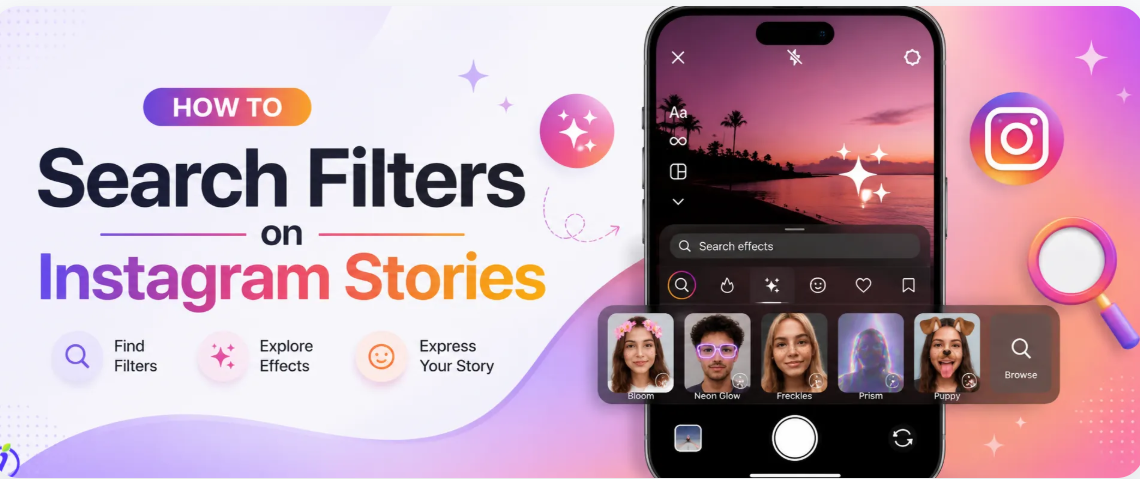
Finding new filters is simple if you know where to look. Follow these easy steps:
Open the Instagram Story Camera
Launch Instagram and swipe right from the home screen or tap your profile picture to open the Story camera.
Browse Available Filters
At the bottom of the camera screen, you’ll see several filters. Swipe through them to preview different effects.
Access the Effect Gallery
Continue swiping until you reach the Browse Effects option. Tap it to open Instagram’s Effect Gallery, where thousands of filters are available.
Search by Keyword
Use the search bar to find filters by entering keywords such as:
- Beauty
- Vintage
- Glow
- Cartoon
- Aesthetic
- Neon
- Cinematic
Instagram will display matching filters created by different designers.
Preview and Save
Tap a filter to test it using your camera. If you like it, select Save Effect so it becomes available whenever you create a Story.
Create Your Story
Return to the Story camera, choose your saved filter, capture your photo or video, and share it with your audience.
How to Find Trending Instagram Filters
Popular filters change regularly as new trends emerge. You can discover trending filters by:
- Exploring the Effect Gallery regularly.
- Watching Stories and Reels from creators.
- Tapping the filter name shown on another user’s Story.
- Following creators who design Instagram effects.
- Searching popular keywords related to current trends.
Trying new filters helps keep your content fresh and engaging.
Tips for Choosing the Best Filters
Not every filter works for every type of content. Consider these tips:
- Select filters that match your personal or business style.
- Avoid using overly dramatic effects on professional content.
- Keep colors consistent across your Stories.
- Test different filters to see which receives the highest engagement.
- Focus on enhancing your content rather than hiding it.
A balanced approach helps your Stories appear authentic and professional.
Common Problems and Solutions
Sometimes users experience issues when searching for filters. Here are a few common fixes:
Effect Gallery isn’t loading
Update Instagram, restart the app, or check your internet connection.
A saved filter disappears
Some creators remove their filters or Instagram retires older effects. Search for similar alternatives if this happens.
Search results are limited
Try using different keywords or broader search terms to discover more options.
Why Businesses Should Use Instagram Filters
Businesses can use Story filters to make promotional content more engaging and visually appealing. Attractive Stories often receive higher views, longer watch times, and better audience interaction. Consistent use of well-chosen filters also strengthens brand identity and creates a more professional appearance across social media.
Whether you’re promoting products, sharing customer experiences, or announcing new services, creative filters help capture attention and encourage users to interact with your content.
Conclusion
Learning how to search filters on Instagram Stories allows users to create more engaging and creative content with minimal effort. Instagram’s extensive collection of filters provides endless opportunities to enhance photos and videos while maintaining a unique visual style. By exploring the Effect Gallery, saving your favorite effects, and experimenting with trending filters, you can create Stories that stand out. Indzu Social encourages creators and businesses to use Instagram filters strategically to increase engagement, strengthen branding, and make every Story more memorable.