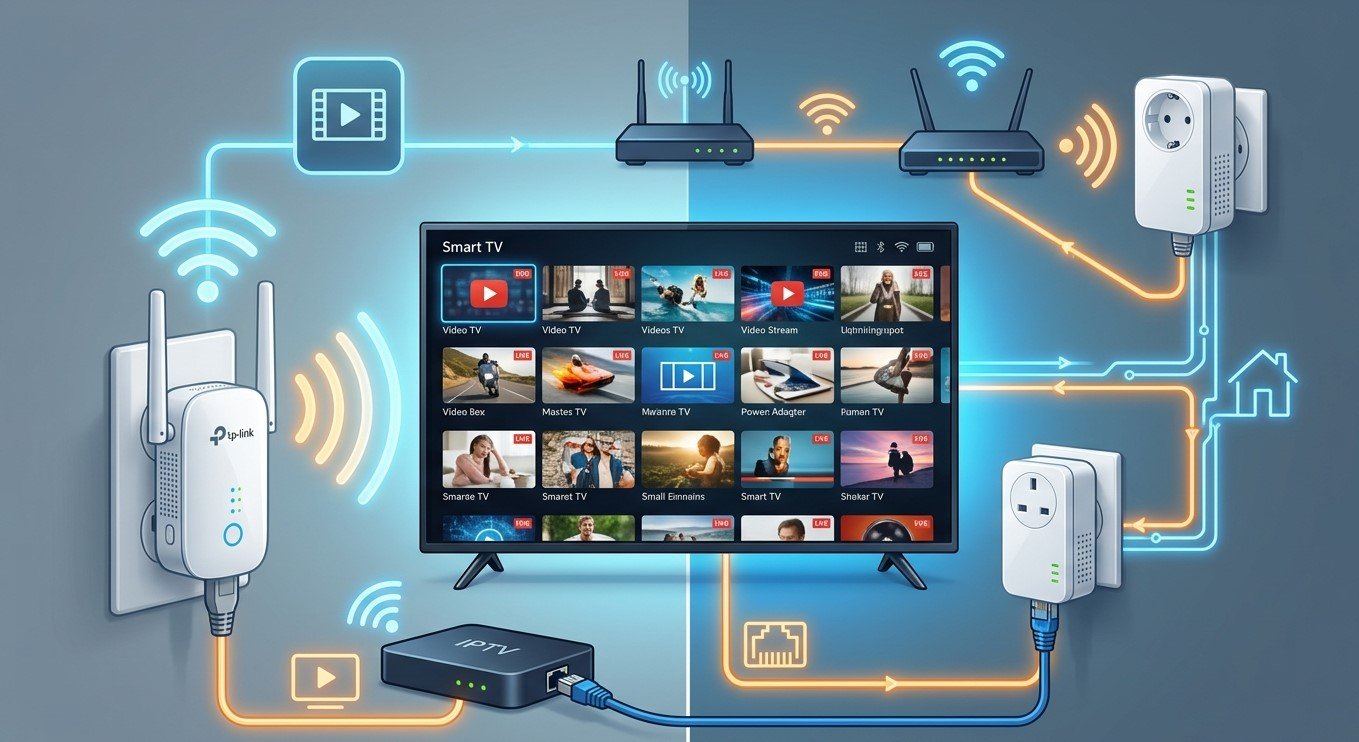
Sometimes the router is in one corner of the house and the TV is in another, and running an Ethernet cable through the walls isn’t an option. Wi-Fi extenders and powerline adapters are the two most common budget fixes. Both can work for IPTV, but they work very differently, and live streaming is more demanding than casual browsing. In this guide, we’ll explain how each one performs, when each makes sense, and how to set them up for the best results with IPTV India on your Indian IPTV Box.
Table of Contents
- Short Answer: Yes, With Caveats
- How a Wi-Fi Extender Works
- How a Powerline Adapter Works
- Extender vs Powerline vs Other Options
- Using a Wi-Fi Extender with IPTV
- Using a Powerline Adapter with IPTV
- Best Practices for Placement and Setup
- Troubleshooting Common Problems
- Which Should You Choose?
- FAQs
Short Answer: Yes, With Caveats
Your Indian IPTV Box only needs a stable connection with enough speed, and it doesn’t care how the data reaches it. Either device can deliver that connection if conditions are right.
The caveats matter, though. Live TV can’t buffer far ahead the way on-demand video can, so brief slowdowns or dropouts show up quickly as freezing. A setup that handles web browsing fine may still struggle during a live match. Advertised speeds on these products are theoretical maximums, and real-world speeds are usually well below them.
How a Wi-Fi Extender Works
A Wi-Fi extender (also called a repeater or booster) picks up your router’s wireless signal and rebroadcasts it, so devices farther away can connect to the extender instead.
The important limitation is that a basic extender uses the same radio to talk to the router and to your device. That can cut the available throughput roughly in half, and sometimes by more, since it has to receive and retransmit the same data. Signal quality also matters. An extender placed where the router’s signal is already weak will repeat a weak signal.
Better extenders have separate radios or a dedicated link back to the router, which helps considerably, though they usually cost more. Features and performance vary a lot by model, so treat the specification sheet as a starting point rather than a promise.
How a Powerline Adapter Works
Powerline adapters send network data over your home’s existing electrical wiring. You plug one adapter into an outlet near your router and connect it to the router with an Ethernet cable. A second adapter plugs into an outlet near your TV, and you connect your box to it with Ethernet.
The big advantage is that you get a wired connection to your device without running new cable, and it isn’t affected by Wi-Fi interference or walls the way a wireless signal is.
The big variable is your home’s wiring. Performance depends on:
- Wiring age and quality
- Distance and the number of junctions between the two outlets
- Whether both outlets are on the same electrical circuit or panel. Adapters often work best on the same circuit, and may work poorly or not at all across different ones, though results vary
- Electrical noise from devices like hair dryers, phone chargers, and some appliances, which can reduce speeds
Advertised speeds are typically optimistic, and real throughput depends heavily on your house.
Extender vs Powerline vs Other Options
| Option | Typical Strengths | Typical Weaknesses |
|---|---|---|
| Basic Wi-Fi extender | Cheap and easy, no wiring | Can halve throughput, adds latency, depends on signal quality at its location |
| Extender with dedicated backhaul | Better speeds than basic units | More expensive, results still vary |
| Powerline adapter | Wired connection to the device, avoids wireless interference | Depends on household wiring and circuits, can be affected by electrical noise |
| Mesh Wi-Fi system | Designed for whole-home coverage, easier management | Higher cost, wireless hops still limit speed unless wired backhaul is used |
| MoCA adapters | Use existing coaxial cable, often stable and fast | Needs coax outlets near the router and the TV |
| Running Ethernet cable | Most reliable | Needs cable runs, which may not be practical |
If your home already has coaxial cable outlets in both rooms, MoCA adapters are worth considering. They often perform well, but compatibility depends on how the coax is wired, so check before you buy.
Using a Wi-Fi Extender with IPTV
An extender can work well when the extender itself has a strong signal from the router and your box is close to the extender.
Do:
- Place the extender about halfway between the router and the dead zone, where it still receives a strong signal, instead of in the dead zone itself
- Choose a model with a dedicated backhaul or tri-band design, if your budget allows
- Use the 5 GHz band where possible for higher speeds, keeping in mind it has less range through walls
- Connect your Indian IPTV Box to the extender by Ethernet, if the extender has a port. This removes one wireless hop and is usually more stable than connecting wirelessly
- Keep it away from interference such as microwaves, cordless phones, and metal objects
- Update the extender’s firmware to get stability fixes
Don’t:
- Chain several extenders. Each hop adds delay and cuts speed
- Put it in a closed cabinet or behind large furniture
- Assume a strong signal-strength indicator means fast speeds. Test the actual throughput
Many extenders create a second network name, which can cause devices to cling to the weaker signal. Some can use the same name as your main network. Both approaches can work, but fixing your box to one network can avoid unpredictable switching.
Using a Powerline Adapter with IPTV
Powerline can be a strong option if your wiring cooperates.
Do:
- Plug adapters directly into wall outlets. Power strips and surge protectors can filter out the signal and reduce speeds, so avoid them unless the adapter has a pass-through designed for it
- Try different outlets. Moving an adapter to another outlet can make a surprising difference
- Use adapters of the same standard, ideally the same brand and line, so they communicate well
- Use the Ethernet port on the adapter to connect your box, and check the cable is firmly seated
- Look for models with a pass-through outlet if you need the outlet for something else
- Keep noisy appliances on other outlets, or away from the adapters’ circuit
Don’t:
- Plug adapters into extension cords or older power strips
- Mix incompatible standards or brands without checking compatibility
- Assume a better spec guarantees better results. Test it in your own home
Powerline works best within a single home. It’s generally not designed to cross between separate buildings or units, and across different circuits or breaker panels it may perform poorly. Safety matters here too: if you’re unsure about your electrical setup, ask a qualified electrician rather than experimenting with your wiring.
Best Practices for Placement and Setup
Whichever option you choose, a few principles help:
- Test before committing. Run a speed test near the extender or at the powerline outlet at the time you’ll normally watch, including a busy evening
- Aim for a stable minimum. For one HD stream, a sustained 10 to 15 Mbps is a commonly recommended cushion, but your actual need depends on the channels you watch and other devices on your network
- Check consistency, not just peak speed. Run tests a few times and watch for large swings
- Prefer Ethernet from the adapter or extender to the box whenever possible
- Reduce other traffic during live events by pausing large downloads and updates
- Keep your box and app updated, and restart devices periodically
- Document what works, including outlet locations and settings, so you can restore them after a power cut
Troubleshooting Common Problems
- Buffering that comes and goes: Look for patterns tied to time of day or household appliances. Powerline performance can dip when certain devices are running, and extender performance can change with Wi-Fi congestion
- Speeds much lower than advertised: This is common. Try a different outlet or extender position, and check for firmware updates
- The adapters won’t pair or link: Make sure both are plugged directly into wall outlets, and try the pairing button procedure in the manual. Resetting both can help
- The extender shows a strong signal but streaming is poor: Test actual throughput, move the extender closer to the router, or try a model with a dedicated backhaul
- Frequent disconnects: Check for overheating, interference, and loose cables, and try a different outlet or channel
- High latency or lag on live sports: Extra hops add delay. Reducing the number of wireless links, or using a wired connection from the router, helps
- Works on one outlet, not another: That’s a normal sign of circuit or wiring differences
If nothing works, a wired Ethernet run or a mesh system with wired backhaul is the most dependable route.
Which Should You Choose?
- Choose a Wi-Fi extender if you need a quick, low-cost improvement, the box can sit in a room with fair coverage, and you can place the extender midway
- Choose powerline if you want a wired connection without running cable, your home wiring is in decent shape, and the outlets are on the same circuit
- Consider MoCA if coax outlets are in both rooms
- Consider mesh with wired backhaul if you want whole-home coverage and can afford it
- Choose running Ethernet if you can, since it’s the most stable and requires no special equipment beyond a cable
Because every home is different, buy from a retailer with a good return policy, and test the setup at your real viewing time before you keep it.
FAQs
1. Will a Wi-Fi extender slow down my internet?
It can reduce throughput for devices connected to it, especially with single-radio models that rebroadcast on the same band. Models with a dedicated backhaul reduce that penalty.
2. Is powerline better than a Wi-Fi extender for streaming?
It can be, because it gives your box a wired connection and avoids wireless interference. But it depends on your home’s wiring, so results vary from house to house.
3. Can I plug a powerline adapter into a power strip?
It’s best to plug directly into a wall outlet. Power strips and surge protectors can filter the signal and lower speeds.
4. Should I connect my Indian IPTV Box to an extender by Wi-Fi or Ethernet?
Ethernet is usually more stable when the extender has a port. It removes one wireless link from the chain.
5. Why is my powerline speed far below what the box says?
Advertised speeds are theoretical maximums. Wiring quality, distance, circuits, and electrical noise all reduce real-world performance.
Get a Better Connection to Your TV
Whether you choose an extender, a powerline adapter, or a cable run, the goal is the same: a steady connection for your viewing room. Pair a dependable IPTV India subscription with a well-connected Indian IPTV Box and enjoy smoother streaming in every room of your home. Explore our IPTV plans today and get more from your setup.