Vendors in this market, mine included, publish an industry page for every vertical we can name. Manufacturing portal, healthcare portal, insurance portal, education portal. Read four of them and you’ll notice they describe the same product with different photography.
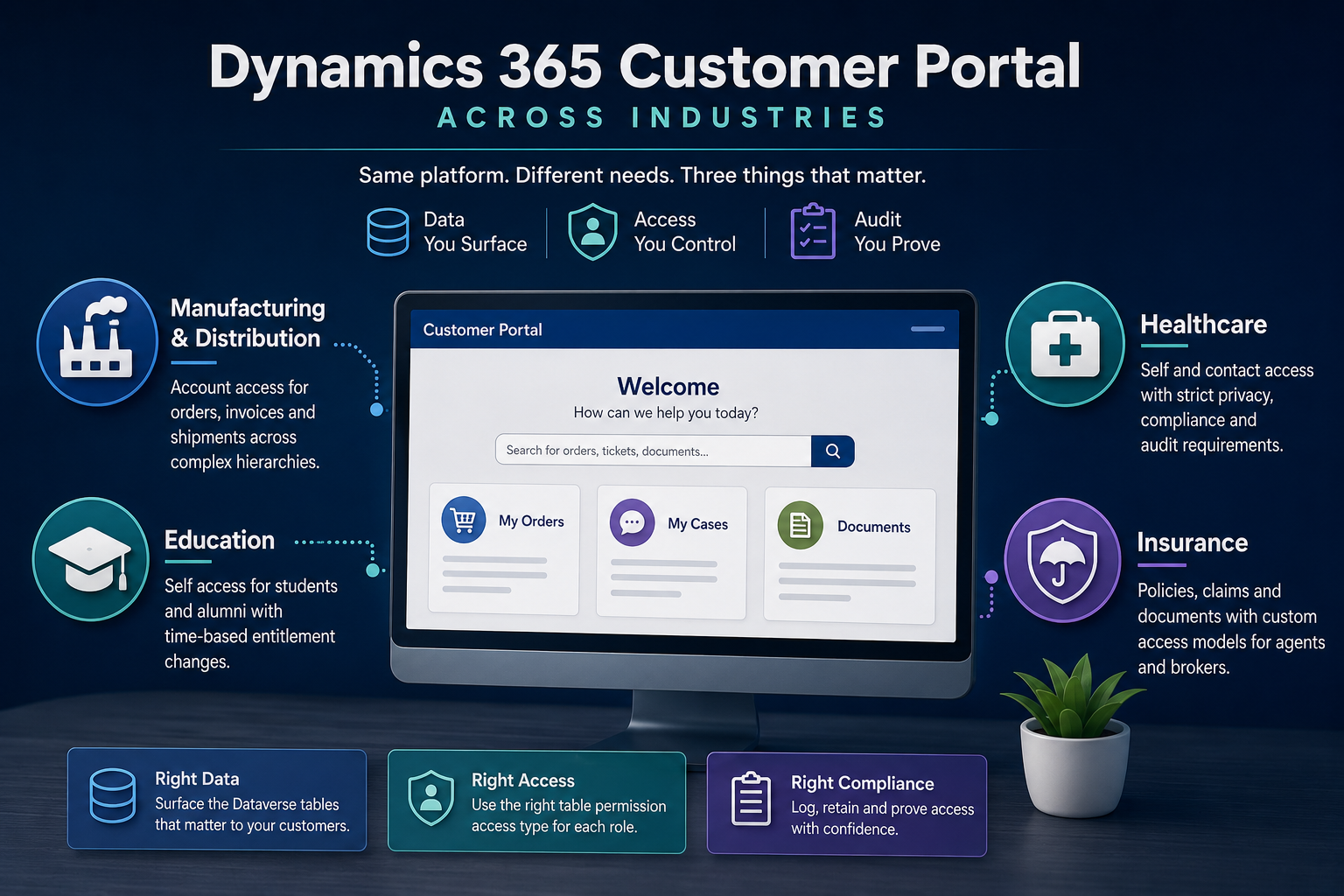
That isn’t quite dishonest, because industry does change the build. It just doesn’t change it in the places the industry pages imply. Across every vertical, exactly three things vary, and none of them is a feature list.
The Dataverse table set you surface. The table permission access type that scopes it. The audit and retention control you wrap around both. Everything else is a theme and a form layout.
Why the differences land in those three places
A Dynamics 365 customer portal performs one operation regardless of who bought it. It takes a person with no Dynamics license, resolves them to a contact record, and returns a filtered subset of Dataverse rows.
Dataverse records are closed to a portal by default. Forms, lists, Liquid templates and the Portals Web API all return nothing until a table permission opens a path, and a table permission does nothing until it’s attached to at least one web role.
So the design conversation is always the same three questions. Which tables hold the answers customers want. Which access type returns the right rows to the right person. And what has to be recorded about who saw what.
The access types are the part worth memorizing. Global returns every row in a table. Contact returns rows related to the signed-in user. Account returns rows related to that user’s account. Self returns only the user’s own contact record. A Custom type, currently in preview and limited to sites enabled for enhanced authorization, filters by a FetchXML condition. A Parent type exists but surfaces only in the Portal Management app.
Six options. Industry is largely a question of which one you reach for and what you have to prove afterward.
Manufacturing and distribution: Account access and the hierarchy problem
The table set is the easy part. Orders, invoices, shipments, sometimes cases and warranty records.
Access type is almost always Account, because a buyer expects to see everything their company ordered rather than only what they personally placed. That resolves through the contact-to-account relationship, which makes account data hygiene a portal dependency rather than a CRM nicety. Duplicate accounts and contacts parented to the wrong record become customer-visible defects on launch day.
The genuinely hard part is structure. A distributor’s customer is rarely one account. It’s a parent with six sites, or a buying group, or a dealer with sub-dealers, and the requirement is usually “the regional manager sees all six sites, the site buyer sees one.” Account access alone gives you one level. Anything above that means either modeling the hierarchy explicitly and walking it, or reaching for the Custom FetchXML access type, which brings the preview and enhanced-authorization constraints with it.
Audit here is light. Commercial confidentiality matters, regulatory retention mostly doesn’t. That combination, high value and low compliance drag, is why distribution portals tend to be the fastest of these to ship.
Healthcare: Self access and an audit requirement that is the project
Table set looks small. Appointments, documents, cases, sometimes a custom table for results or referrals.
Access type shifts hard toward Self and Contact. A patient sees their own records and nobody else’s, and the Account pattern that serves manufacturing is actively dangerous here, since a shared account grouping can expose one family member’s records to another.
And then the third variable stops being a footnote and becomes the bulk of the work. Who viewed which record, when, retained for how long, and provable to an auditor. That’s not a portal feature you switch on. It’s an architecture decision that touches logging, storage, retention policy, and the process for responding to an access request.
Teams costing a healthcare portal against a distribution portal they delivered last year are usually wrong by a wide margin, and the gap is almost entirely here. The pages look similar. The evidentiary obligations do not.
Insurance: where the access model runs out
Policies, claims, documents, payment history. So far ordinary.
Then the broker case arrives and breaks the pattern. A broker or agent sees a book of business, which is neither their own records nor one account’s records. It’s an arbitrary set defined by a relationship the standard access types don’t name.
This is the clearest example of a portal requirement that no template solves. Your options are to model the book of business as a real relationship in Dataverse and grant Account access through it, or to use the Custom FetchXML type and accept its preview status and its restriction to enhanced-authorization sites. Both are legitimate. Both need deciding before anyone opens the design studio, because retrofitting an access model is the single most expensive change in a portal project.
Worth saying plainly: if your requirement needs Custom access, you are depending on a preview feature. Plan a fallback.
Education: time is the variable nobody scopes
Applications, enrollments, transcripts, fee records. Access is mostly Self.
What’s distinctive is that entitlement changes on a calendar. An applicant becomes a student becomes an alumnus, and each transition changes which tables they should reach. Almost nobody scopes this at the start, and the failure is quiet: graduates keep portal access to systems nobody meant to leave open, because the web role that was correct in September was never revoked in June.
The mechanism is unglamorous. Something has to change the web role assignment when the contact’s status changes, and that something has to be tested against the real academic calendar rather than a demo.
The 2026 change that lands differently by industry
One platform shift is worth putting on every roadmap in this space.
Power Pages has always run its own authorization model, web roles and table permissions, separate from Dataverse security roles. Microsoft is merging them. The feature that unifies Power Pages web roles and site users with Dataverse security roles and system users reached public preview on 8 July 2026 and is scheduled for general availability in November 2026.
Read that through the three variables and it lands unevenly. For regulated industries it’s a straightforward gain, because centralizing authorization in Dataverse means one place to evidence access control instead of two. For anyone running an elaborate hand-built web role scheme it’s migration work, and the more inventive the scheme the more of it there is.
Two related dates from the same wave. Dynamics 365 portal templates on Bootstrap 5 and the enhanced data model reached general availability on 15 May 2026. And Microsoft has said release plans stop being published from September 2026, with new capabilities moving to the AI at Work roadmap, so the source you check for this kind of thing is changing too.
What this means for choosing an industry template
Here’s the conclusion I’d push back on if a vendor gave it to me, so I’ll state it against my own interest.
The industry template is the least consequential thing in the purchase. It ships a theme, some form layouts, and a sample table set, all of which you will modify. What it cannot ship is the access model, because that depends on your account structure, your hierarchy depth, and your regulator. Templates built on the legacy data model or around a fixed form set are a constraint you inherit rather than a head start you gain.
The useful evaluation isn’t which vendor has your industry on their website. Third-party portal products, CRMJetty among them, and Power Pages itself all publish industry pages, and the pages tell you about marketing rather than fit. The useful question is whether the product can express the access rule your business actually needs, and you can answer it in an afternoon: write down your three most common customer questions, name the Dataverse table behind each, and name the access type that returns the right rows. If one of them won’t resolve, you’ve found the real project, and no template was ever going to hide it.