Product images play a major role in how customers experience a Shopify store. They influence everything from visual appeal to mobile loading speed and product engagement. For many store owners using a Shopify image optimization app, one common question is whether portrait or square product images work better for performance and user experience.
The answer depends on more than just design preference. Both image formats affect browsing behavior, product visibility, and page speed differently. Choosing the right format, along with proper optimization, can help Shopify stores create a smoother and more professional shopping experience.
Why Product Image Shape Matters on Shopify
Most Shopify themes rely heavily on visuals. Product grids, collection pages, featured sections, and mobile layouts are all shaped by the dimensions of uploaded images.
When image sizes are inconsistent, stores often look cluttered or unprofessional. This can create friction for customers trying to browse products quickly. Image shape also affects:
- Mobile browsing experience
- Product visibility in collections
- Scroll behavior
- Perceived professionalism
- Page loading speed
- Layout stability
Even if customers do not consciously notice image dimensions, they definitely notice when a store feels harder to browse.
Why Square Product Images Are Popular on Shopify
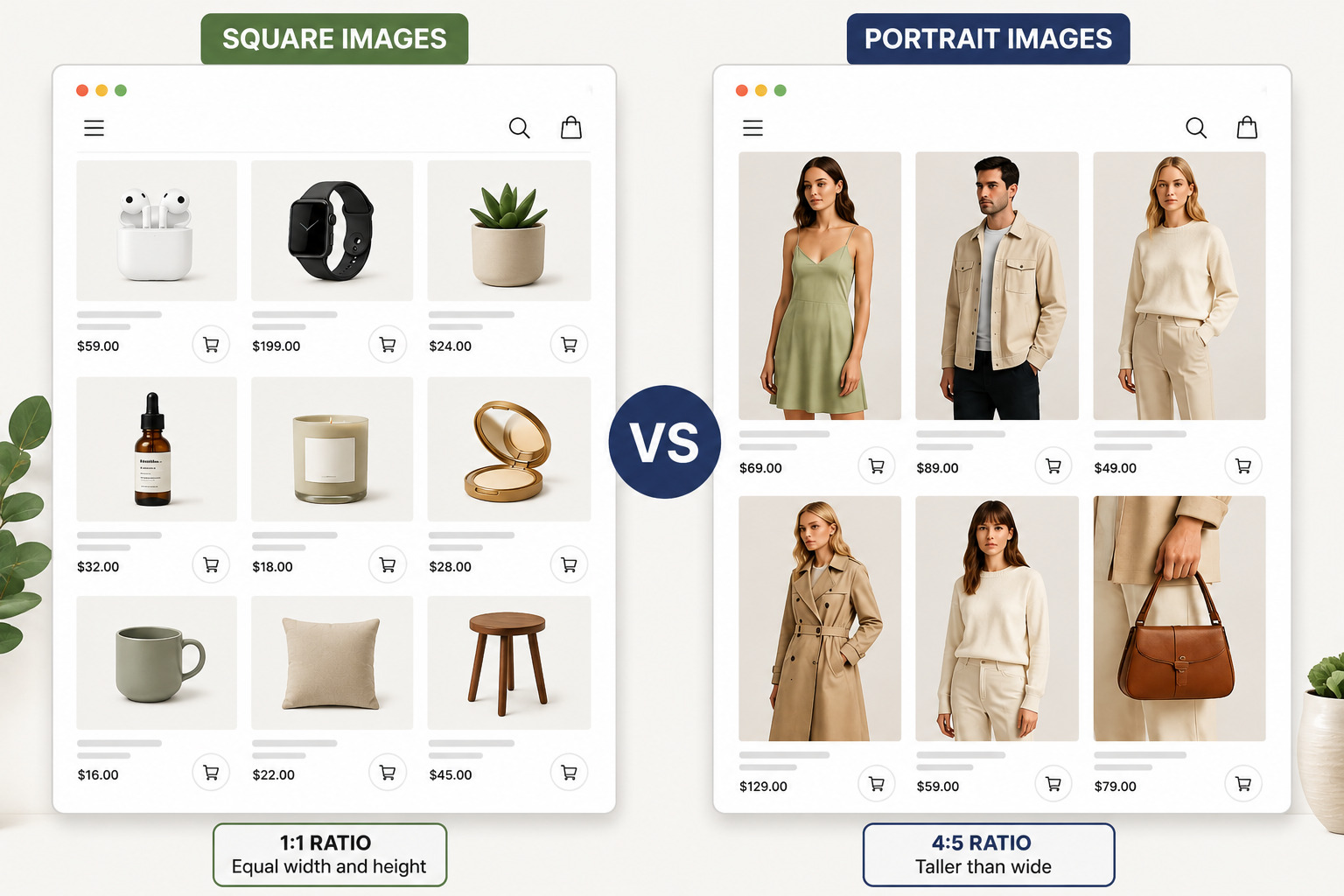
Square images use a 1:1 ratio, meaning the width and height are equal.
This is one of the most common image formats used in e-commerce because it creates clean and symmetrical product grids. Many Shopify themes are also designed with square product thumbnails in mind.
Benefits of Square Images
Square product images are widely used in Shopify stores because they create a clean, balanced, and easy-to-browse shopping experience across both desktop and mobile devices.
Cleaner Collection Pages
Square images create a uniform appearance across collections and category pages. Products align neatly, which helps stores look more organized.
Better Mobile Consistency
On smartphones, square images fit naturally into responsive grids. This creates smoother scrolling and reduces awkward cropping issues.
Easier Theme Compatibility
Many Shopify themes automatically optimize square product layouts better than mixed image dimensions.
Faster Visual Scanning
Customers can browse products more quickly when all thumbnails follow the same structure.
Drawbacks of Square Images
While square images offer consistency, they are not ideal for every product type. Fashion brands, jewellery stores, and apparel businesses sometimes struggle to display full products properly within square crops.
Important details may appear smaller unless zoom features are added. Square images can also leave excessive space around tall products.
When Portrait Product Images Perform Better
Portrait images are vertically oriented, usually using ratios like 4:5 or 2:3. They are especially common in fashion e-commerce because they allow products to appear taller and more detailed.
Benefits of Portrait Images
Portrait product images help showcase full product details in a more immersive way, making them especially effective for visually driven brands that want to create a premium and engaging shopping experience.
Better Product Visibility
Portrait layouts help showcase full-length products like dresses, coats, pants, or mannequins without aggressive cropping.
More Premium Visual Feel
Many modern fashion brands use portrait photography because it creates a more editorial and immersive shopping experience.
Stronger Mobile Engagement
Portrait images occupy more vertical screen space, helping products stand out while scrolling.
Drawbacks of Portrait Images
Portrait images can sometimes create uneven product grids if not managed properly. They can also increase scrolling length on mobile collection pages because fewer products fit on the screen at once. Larger vertical images can also become heavier in file size if not compressed correctly.
This is where using an efficient Image compressor becomes important. Optimizing portrait images helps reduce unnecessary file weight while maintaining clarity, especially for mobile shoppers browsing on slower networks.
Which Format Performs Better for Shopify Speed & Performance?
From a pure performance perspective, square images often have a slight advantage. Why? Square thumbnails usually require less vertical rendering space and can sometimes load more efficiently in product grids.
However, the real performance difference usually comes down to image optimization practices rather than shape alone.
A poorly optimized square image can still slow down a Shopify store more than a properly compressed portrait image. Performance depends on factors like:
- File size
- Compression quality
- Lazy loading
- Image dimensions
- Mobile responsiveness
- Modern image formats
This is why many Shopify merchants now rely on automated optimization tools instead of manually resizing every product image.
UX Comparison: Portrait vs Square Images
From a user experience perspective, both portrait and square product images serve different purposes. The right format often depends on how customers browse products and what details they expect to see before making a purchase.
Some stores benefit more from clean and uniform layouts, while others need larger visuals that highlight product details more clearly.
Square Images Work Better For:
- Electronics stores
- Home decor products
- Beauty products
- Gadgets
- General ecommerce stores
- Minimalist product grids
Square images usually make collection pages look cleaner and easier to scan. They help customers compare multiple products quickly without visual distractions.
Portrait Images Work Better For:
- Fashion brands
- Clothing stores
- Jewelry stores
- Luxury products
- Lifestyle-focused brands
Portrait images are often better for showcasing products that rely heavily on visual presentation. They allow more vertical detail, which can help products appear more immersive and premium on mobile devices.
Best Practices for Shopify Product Images
Choosing the right image format is important, but proper optimization matters just as much. A few simple image practices can help Shopify stores improve both performance and user experience.
Choose One Core Ratio
Stick to either square or portrait images across most of your store to create a cleaner and more professional layout. Consistent image ratios also help collection pages look more organized and easier to browse.
Optimize Before Uploading
Uploading oversized raw images directly from cameras or design tools can slow down your store unnecessarily. Resizing images before upload helps reduce file weight while keeping visuals sharp for customers.
Prioritize Mobile Experience
A large portion of Shopify traffic now comes from mobile users, so product images should display properly on smaller screens. Fast-loading and well-positioned images can improve browsing experience and reduce frustration during shopping.
Compress Images Properly
Heavy image files can affect page speed and overall store performance. Proper compression helps maintain image quality while reducing loading times, especially for mobile visitors.
Test Collection Pages
Always preview product grids on both desktop and mobile devices before finalizing your image setup. Sometimes an image format may look great on a desktop but create spacing or alignment issues on smaller screens.
Final Thoughts
If your Shopify store sells fashion, apparel, jewelry, or lifestyle products, portrait images often deliver a stronger visual experience. If you sell electronics, home goods, beauty products, or maintain a large catalog, square images typically provide a cleaner browsing experience. In either case, image optimization has a much larger impact on performance than aspect ratio alone.
FAQs
Are square images better for Shopify stores?
Square images are often easier to manage because they create uniform product grids and work well across many Shopify themes. They are especially useful for stores with large product catalogs.
Do portrait images slow down Shopify websites?
Not necessarily. Portrait images only become a problem when file sizes are too large or poorly optimized. Proper compression can help maintain performance.
What is the ideal Shopify product image ratio?
Many Shopify stores use either 1:1 square images or 4:5 portrait images, depending on the product category and branding style.
Should fashion brands use portrait product images?
Portrait images are commonly preferred for fashion stores because they showcase full-length products more naturally and create a more editorial appearance.
How can I reduce Shopify image file sizes?
Using compression tools, resizing oversized uploads, and optimizing images before publishing can significantly reduce file sizes without heavily affecting quality.
Does image optimization improve ecommerce conversions?
Faster-loading product pages often create smoother browsing experiences, which can help reduce friction during shopping and support better engagement overall.