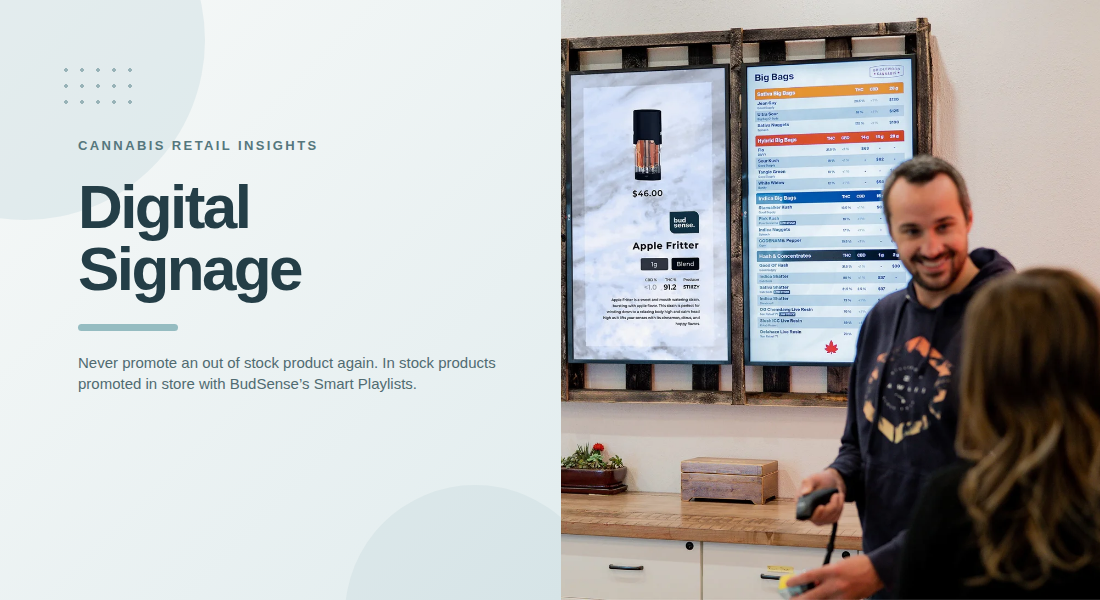
Retail stores need clear and consistent ways to communicate product information, promotions, and important updates to customers. In cannabis dispensaries, where product availability and details can change frequently, digital signage provides a practical way to present information across in-store screens. When screen content is scheduled properly, retailers can organize messages in advance, reduce repetitive manual work, and keep store communication more consistent.
A structured screen schedule helps employees decide what customers should see and when they should see it. Instead of updating every display throughout the day, retailers can prepare content for specific periods, campaigns, or store activities. This approach makes digital displays easier to manage while helping customers access relevant information during their shopping experience.
Why Store Communication Needs a Clear Plan
Retail communication involves more than displaying advertisements. Customers may need product information, pricing details, promotional announcements, category guidance, or reminders about store policies. If these messages appear randomly or remain on screens for too long, customers may overlook important information.
A communication plan helps retailers prioritize messages according to their purpose. For example, a store might display general product categories during regular shopping hours and introduce promotional messages during a planned campaign. Each message should have a clear objective rather than compete for attention with unrelated content.
Planning also helps employees avoid last-minute changes. When content is prepared ahead of time, staff can review wording, check details, and confirm that the information is appropriate before it appears on store screens.
How Scheduled Screen Content Improves Organization
Scheduling allows retailers to determine which messages appear at particular times or during specific periods. This makes it easier to coordinate communication without requiring staff to manage every display manually.
For example, a dispensary could schedule educational content for one period and promotional announcements for another. Seasonal campaigns, store notices, and general brand messaging can also be arranged in advance, depending on the store’s needs.
A well-organized schedule can offer several advantages:
- Better timing: Messages appear during their intended campaign or period.
- Consistent communication: Screens follow an established content plan.
- Less manual work: Employees spend less time making repeated changes.
- Fewer outdated messages: Scheduled end dates help prevent old campaigns from continuing unnecessarily.
- Improved coordination: Multiple screens can follow a shared communication strategy.
Scheduling does not guarantee that every message will reach every customer. However, it gives retailers greater control over what appears on their displays and when.
Match Content to Customer Needs
Effective digital signage should reflect what customers need to know while visiting the store. A screen filled with unrelated promotions, long paragraphs, and changing messages can be difficult to follow.
Retailers should begin by identifying the purpose of each content item. Some messages may introduce product categories, while others communicate store announcements or explain how customers can access additional information.
Short headings, concise descriptions, and clear visual hierarchy make messages easier to understand. Important information should be visible without requiring customers to read several paragraphs while moving through the store.
Cannabis retailers should also ensure that displayed information is accurate and complies with applicable advertising, age-restriction, and labeling requirements. Claims about products should be supported by verified information, and promotional content should be reviewed before publication.
Coordinate Multiple Screens Across the Store
Stores with several digital displays need a consistent approach to screen management. Without a plan, different screens may show duplicate messages, unrelated promotions, or information that no longer matches the store’s current priorities.
Retailers can assign a purpose to each display. One screen might present general store information, another could focus on selected product categories, and another might support approved promotional campaigns. The exact arrangement should depend on the store layout and customer flow.
A shared schedule can help coordinate these screens while allowing each display to serve a different function. This avoids unnecessary repetition and creates a more organized experience.
For businesses operating multiple locations, centralized content management can also support consistency. Teams may prepare approved messaging for several stores while adjusting details when local inventory, promotions, or operational needs differ.
Use Smart Playlists to Structure Screen Content
A playlist determines the order in which content appears on a display. Instead of selecting each item manually whenever a screen needs updating, retailers can organize content into a planned sequence.
For example, a playlist might alternate between category information, store announcements, educational messages, and approved promotional content. A balanced sequence gives each message a purpose and prevents one type of content from dominating the display.
Retailers should consider message length, repetition, and readability when building playlists. A short announcement may need less screen time than a detailed product explanation. Similarly, frequently repeated messages should remain useful rather than becoming background noise.
Smart playlist features can make this process more manageable when supported by the digital signage platform. Inventory-based or condition-based content may also help retailers align selected displays with changing store information, depending on available integrations and configuration.
Keep Screen Information Accurate and Relevant
Scheduled content still requires regular review. A campaign may end, a product may become unavailable, or a store announcement may no longer apply. If these changes are not reflected on digital displays, customers can receive confusing or outdated information.
Retailers should establish a routine for reviewing scheduled items, checking campaign end dates, and confirming important product details. Responsibility for these tasks should be assigned clearly so that updates do not depend on one employee remembering to make them.
It is also useful to maintain an approval process for new content. A quick review before publication can catch spelling errors, incorrect prices, inconsistent messaging, and unsuitable claims.
Automation can reduce repetitive tasks, but it cannot replace accurate source data and responsible content management. The best results come from combining scheduling tools with regular human oversight.
Measure and Improve Content Performance
A content schedule should be reviewed periodically to determine whether it serves its intended purpose. Retailers can consider customer questions, staff feedback, campaign outcomes, and available screen-performance analytics when evaluating their approach.
If customers frequently ask about information already displayed on a screen, the message may need clearer wording or a more visible position. If a playlist contains too many similar promotions, the sequence may benefit from greater variety.
Retailers should make changes based on practical observations rather than adding more content automatically. A smaller number of relevant messages can be more effective than a crowded display that tries to communicate everything at once.
Regular reviews also help businesses identify which messages should remain, which need revision, and which can be removed from future schedules.
Cannabis retailers looking to improve their in-store communication can use BudSense to help coordinate digital displays, organize screen content, and maintain consistent messaging across their stores. A structured approach makes it easier for retail teams to manage information and keep displays aligned with changing business needs.
Final Thoughts
Scheduled screen content gives retailers a practical way to organize communication, coordinate digital displays, and reduce repetitive manual updates. By planning messages in advance, assigning each screen a clear purpose, and reviewing information regularly, businesses can create a more consistent in-store experience.
The key is to treat digital signage as an ongoing communication process rather than a collection of advertisements. Clear messages, relevant playlists, accurate information, and thoughtful scheduling help retailers keep displays useful for both customers and staff.
Cannabis retailers looking to coordinate their in-store screens can consider BudSense digital signage solutions as part of a broader approach to retail communication. A structured content workflow can help teams manage displays more efficiently while keeping messaging aligned with their store’s needs.
FAQs
1. What is scheduled content in digital signage?
Scheduled content is information arranged to appear on digital screens at designated times or during specific periods. It can include announcements, educational messages, promotional content, and general store information.
2. How does scheduling reduce staff workload?
It allows employees to prepare and organize messages in advance rather than repeatedly changing displays manually. Staff still need to review content and confirm that it remains accurate.
3. What should cannabis dispensaries display on digital screens?
Depending on local regulations and store needs, displays may present product categories, general store information, approved promotions, and educational content. All messages should comply with applicable advertising and product-information requirements.
4. Can multiple screens display different content?
Yes. Depending on the platform, retailers can assign different content or playlists to individual screens while managing them through a shared system.
5. How often should digital signage schedules be reviewed?
Schedules should be reviewed whenever promotions, product details, or store information change. A regular review routine also helps retailers remove outdated content and improve the relevance of their messages.