A well-organized retail display can influence how customers perceive products before they speak with a staff member. In cannabis stores, a dispensary digital menu can help customers understand available products, compare key details, and notice relevant promotions while browsing. The first things customers see often depend on the screen layout, text size, product organization, and visual balance.
Digital displays are more than electronic versions of printed menus. They provide retailers with a flexible way to present product information and adapt content to changing inventory or store priorities. When the most useful details are easy to recognize, customers can spend less time trying to understand the display and more time considering their options.
1. Clear Headings and Readable Text
Customers often notice large headings before smaller product details. A display with a clear visual hierarchy helps people understand what each section contains without reading every line.
Retailers should use readable fonts, consistent heading sizes, and enough spacing between product categories. Text that looks clear on a computer monitor may become difficult to read when displayed across a store, especially when customers are standing several feet away.
A practical layout gives the most important information enough space. Category names, product names, and essential details should be distinguishable at a glance. Decorative fonts and excessive text can make a screen harder to use, even when the information itself is accurate.
2. Product Names and Categories
Once customers recognize the main headings, they often look for categories that match their interests. A display that separates product types into understandable sections makes browsing more straightforward.
Retailers can organize menus around relevant categories, such as flower, pre-rolls, edibles, concentrates, and vape products. The exact structure should reflect the store’s inventory and the way its customers prefer to browse.
Consistent naming also matters. If similar products are labeled differently across the display, customers may struggle to compare them. Clear categories and familiar terminology help create a more predictable browsing experience.
3. Prices and Essential Product Details
Price is often one of the first details customers check when comparing products. If pricing is difficult to locate or appears in inconsistent positions, customers may need extra time to understand their options.
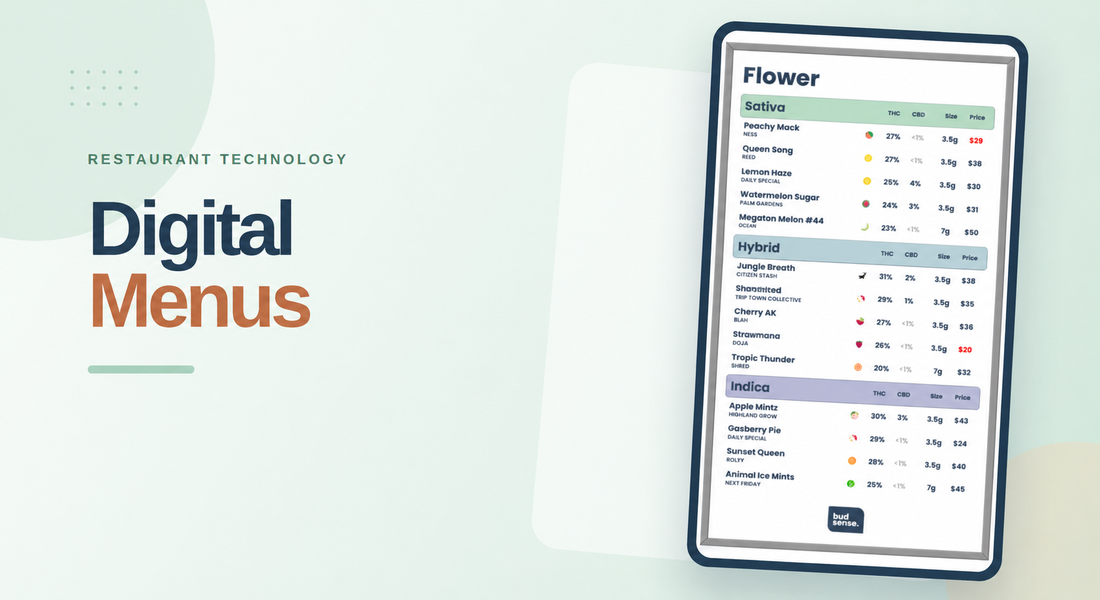
A useful digital menu places prices close to the corresponding product names. Depending on the product and the information available, retailers may also show package size, THC and CBD information, flavor, or other relevant attributes.
The goal is to make comparisons easier without overcrowding the screen. Not every detail needs equal visual emphasis. Retailers should prioritize information that helps customers distinguish products, while keeping secondary details readable and appropriately organized.
4. Color Contrast and Visual Balance
Color helps direct attention, separate categories, and reinforce a store’s visual identity. However, using too many colors can make a display feel cluttered and distract customers from product information.
A consistent color palette helps customers recognize recurring elements. Strong contrast between text and background improves readability, while restrained accent colors can highlight selected categories, promotions, or product attributes.
Retailers should also consider the environment in which the screen is installed. Glare, bright lighting, viewing distance, and screen placement can all affect how easily customers read the content. Testing the display in the actual store is more useful than judging it only on a design preview.
5. Product Images and Featured Items
Images can catch attention quickly, particularly when customers are unfamiliar with a brand or product. High-quality visuals can give a digital display more personality and help featured products stand out from standard menu listings.
Retailers should use images that are relevant, clear, and consistent with their brand. Too many large visuals, however, can reduce the space available for prices and product details. A balanced display combines visual appeal with practical information.
Featured items can also receive a distinct position on the screen. Retailers might highlight new arrivals, selected brands, or current promotions, provided the content is relevant and clearly identified. The aim is to guide attention without making the entire menu compete for it.
6. Badges, Labels, and Promotions
Small visual indicators can help customers notice useful product attributes without reading a lengthy description. Labels such as “New Arrival,” “On Sale,” or “Staff Pick” can make particular products easier to recognize when the labels accurately reflect the store’s information.
A digital menu should use these markers selectively. If every product has several badges, the labels lose their ability to direct attention. Consistent wording, readable colors, and clear placement make these visual cues more useful.
BudSense supports customizable labels and badges on digital menus, allowing retailers to emphasize selected product characteristics and promotions.
Stores should ensure that promotional claims and product information remain accurate and comply with applicable cannabis advertising rules.
7. Current Availability and Reliable Information
A visually appealing screen can still frustrate customers if it shows products that are no longer available or displays outdated prices. Customers need to trust the information presented to them, especially when comparing products before speaking with a budtender.
Retailers should establish a reliable process for updating product details as inventory changes. Point-of-sale integration can reduce manual work by synchronizing menu information with inventory systems. BudSense, for example, describes automatic updates for in-stock products, prices, and sales through its POS integrations.
Regular checks are still important. Staff should verify that displayed details match store records and that promotions appear during the correct periods. Accurate information helps prevent unnecessary confusion and supports a more consistent experience across the store.
Making the First Impression Count
The strongest digital displays balance readability, useful product information, visual appeal, and accuracy. Retailers do not need to fill every available space with content. Instead, they should decide which details customers need first and arrange the screen around those priorities.
With the right BudSense menu software, dispensaries can manage digital menus, customize product presentation, and keep menu information aligned with available inventory. These capabilities can help retail teams maintain a more organized display while adapting it to changing products and promotions.
Final Thoughts
Customers often notice headings, product categories, prices, colors, and featured items before reading detailed descriptions. A thoughtful digital retail display makes these elements easy to recognize without overwhelming the viewer.
For cannabis retailers, the best approach is to prioritize clear design and dependable information. By reviewing menus regularly, limiting unnecessary visual clutter, and presenting important product details consistently, dispensaries can create displays that help customers browse with greater confidence.
FAQs
1. What do customers notice first on a digital retail display?
Customers may first notice large headings, contrasting colors, featured products, or promotional labels. The exact order depends on screen placement, design, lighting, and viewing distance.
2. Why is readability important on a dispensary digital menu?
Readable text helps customers identify product categories, compare prices, and understand essential product information without unnecessary effort.
3. Which product details should a digital menu display?
Depending on the product, useful details can include its name, brand, price, size, THC and CBD information, and relevant product characteristics.
4. How can dispensaries highlight products without cluttering screens?
Retailers can use a limited number of featured sections, consistent badges, clear headings, and balanced spacing to guide attention without overwhelming customers.
5. How do automatic menu updates help cannabis retailers?
When connected to a compatible point-of-sale system, automatic updates can reduce manual changes and help keep displayed inventory and prices aligned with store records.