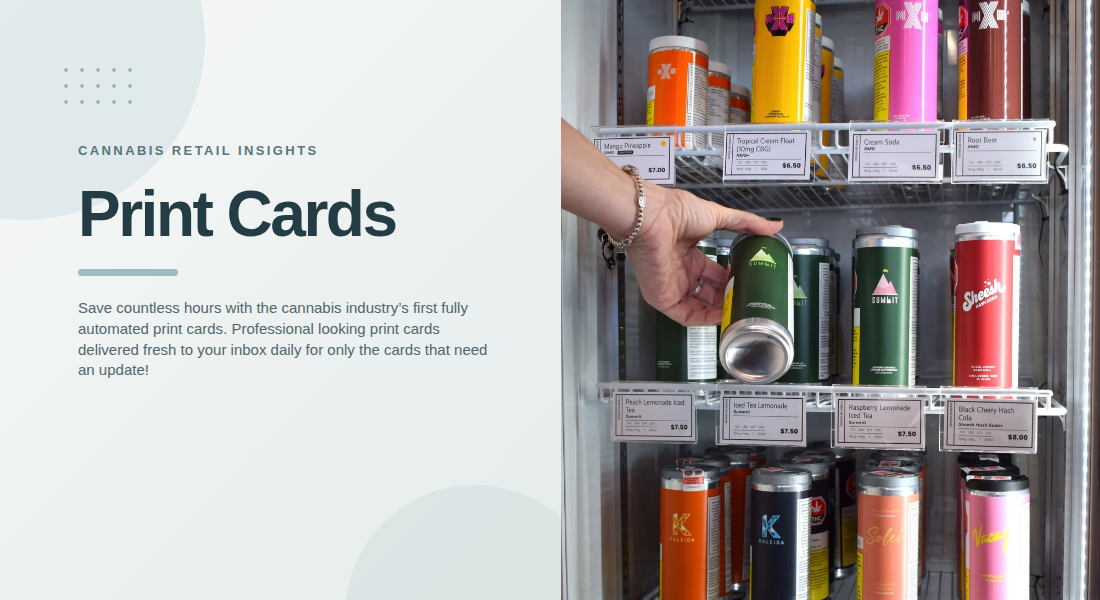
When customers browse a dispensary, clear product information can make their shopping experience easier and more comfortable. Well-designed cards help people compare options without needing to ask staff about every detail. With automated print cards, retailers can maintain consistent product information while reducing the time spent manually updating individual displays.
The goal is to give customers the information they need in a format that is easy to read, accurate, and consistent with the store’s overall presentation.
1. Product Name and Brand
Every product card should clearly identify the item it represents. The product name and brand help customers distinguish between similar options, especially when a display includes several products from different producers.
Use a readable font and give the product name enough space to stand out. If a brand offers several varieties, make sure the name on the card matches the product packaging and inventory record.
Consistency is particularly important for retailers with large selections. A standard format helps customers scan displays quickly and makes it easier for employees to check whether each card belongs beside the correct product.
2. Price and Package Size
Price is one of the first details many customers look for. Product cards should display it prominently so customers can compare options without confusion.
Package size is equally useful because products may be available in different quantities or formats. Showing the correct size alongside the price gives customers a clearer understanding of what they are considering.
Retailers should also establish a consistent approach to sale prices and promotional labels. If a discount is displayed, its conditions should be clear and the information should match the store’s current promotion.
When product prices change frequently, automated updates can reduce the risk of displaying outdated amounts. Staff should still follow the retailer’s process for checking discrepancies and replacing printed cards when necessary.
3. THC and CBD Information
Cannabinoid information can help customers understand important differences between products. Where applicable and permitted by local regulations, product cards may include THC and CBD percentages or amounts.
Retailers should present these figures clearly and use consistent units and formatting. They should also verify that the displayed information matches the relevant product data and packaging.
Avoid using cannabinoid figures as a substitute for a complete product description. Customers may have different preferences and levels of experience, so factual information is more useful than exaggerated claims about a product’s effects.
Automated systems can help keep supported cannabinoid fields consistent across cards, but accurate source data remains essential.
4. Strain Type, Flavour, and Product Characteristics
For products where these details are relevant, a short description can help customers understand what distinguishes one option from another. Cards may include strain classification, flavour notes, aroma descriptions, or other verified characteristics.
Keep descriptions concise. A few meaningful details are usually easier to scan than a long paragraph filled with technical language.
Retailers can also use labels to highlight specific attributes or categories. For example, a card might identify a product as a new arrival or indicate a featured item. Labels should be used consistently and only when the designation is accurate.
These details help create a more informative display without overwhelming customers with too much text.
5. Product Description and Key Features
A brief product description can explain what makes an item different from others in the same category. Depending on the product, useful information may include its format, intended use as stated by the manufacturer, flavour profile, or notable ingredients.
The description should be factual, easy to understand, and appropriate for the retailer’s market. Avoid unsupported medical claims or promises about how a product will affect an individual.
Retailers should also consider the available space. Product cards are designed for quick reference, so prioritize the most useful details rather than trying to include every piece of information in a small area.
A consistent writing style across cards can make the entire display feel more organized and professional.
6. Clear Design and Readable Formatting
Accurate information is only helpful when customers can read it. Small text, crowded layouts, and inconsistent formatting can make product cards difficult to use, particularly in busy retail environments.
A practical design should include:
- A clear visual hierarchy for product names and prices.
- Readable text with sufficient contrast against the background.
- Consistent placement of cannabinoid and package information.
- Short descriptions with unnecessary wording removed.
- Labels and badges that highlight useful details without cluttering the card.
Brand colours can make displays recognizable, but readability should remain the priority. Retailers should review printed samples before rolling out a new design across their stores.
7. Keep Product Cards Current With Automation
Maintaining individual cards manually can become a significant task when a dispensary carries many products. Every change to a price, package size, or product detail may require an employee to locate the correct file, edit it, and print a replacement.
Automated print cards help simplify this process by connecting supported product information to a menu management workflow. BudSense offers customizable print cards, POS integration, scheduled printing, and smart printing that can generate cards for new or updated products instead of requiring every card to be reprinted.
This selective approach can reduce unnecessary printing and help employees focus on the cards that actually need attention. Retailers can also use consistent templates to maintain a uniform appearance across product categories.
Automation does not remove the need for quality checks. Incorrect source information can still produce an incorrect card, so stores should maintain clear procedures for verifying product data and reviewing updates.
8. Maintain Consistency Across Multiple Locations
Retailers operating several dispensaries may face an additional challenge: keeping product cards consistent across different locations. Each store may carry a different assortment, while brand presentation and information standards still need to remain aligned.
Shared templates can help standardize card layouts, colours, and the placement of key details. Where multi-location tools are available, centralized workflows can also reduce repeated setup and editing tasks.
Local teams should still confirm that each card reflects the products and prices relevant to their own store. Standardization works best when it provides a consistent framework without displaying information that does not apply to a particular location.
For retailers looking to streamline this process, BudSense menu software offers tools for managing cannabis product information and print merchandising.
Final Thoughts
Effective cannabis product cards combine accurate information, readable design, and a consistent format. Product names, prices, package sizes, cannabinoid details, and relevant descriptions can help customers compare options with greater confidence.
As product ranges and prices change, automated print cards can reduce repetitive work and make it easier to keep displays current. By pairing automation with reliable source data and regular checks, retailers can maintain professional displays while giving customers clear information at the point of purchase.
FAQs
1. What information should a cannabis product card include?
A card may include the product name, brand, package size, price, relevant THC and CBD information, and a short product description. The exact details depend on the product and local requirements.
2. Why is package size important on product cards?
Package size helps customers understand the quantity they are purchasing and compare products with different formats or quantities.
3. How do automated print cards save retailers time?
They can reduce manual editing by generating updated cards for new or changed products. This means staff do not need to recreate every card whenever information changes.
4. Can retailers customize cannabis product cards?
Yes. Depending on the software, retailers can customize card layouts, colours, and other design elements to match their branding and display requirements.
5. How can retailers prevent outdated product information?
Retailers can use POS-integrated tools, maintain accurate product records, establish clear update responsibilities, and regularly check printed cards against current information.