Digital Signage has become a practical tool for cannabis dispensaries that need to communicate product information, display promotions, and maintain a consistent in-store experience. As product selections and inventory change throughout the day, traditional posters and manually updated displays can become difficult to manage. Digital screens give retailers a flexible way to present relevant information while making updates easier to coordinate.
For dispensary managers, digital signage is not simply about replacing printed posters with screens. It can support daily operations, help customers navigate product information, and provide a more organized way to manage marketing content across one or several locations.
1. Presenting Product Information Clearly
Cannabis dispensaries often carry a broad selection of flower, pre-rolls, edibles, concentrates, vape products, and other categories. Customers may need to compare product names, prices, package sizes, and cannabinoid details before deciding what to ask about.
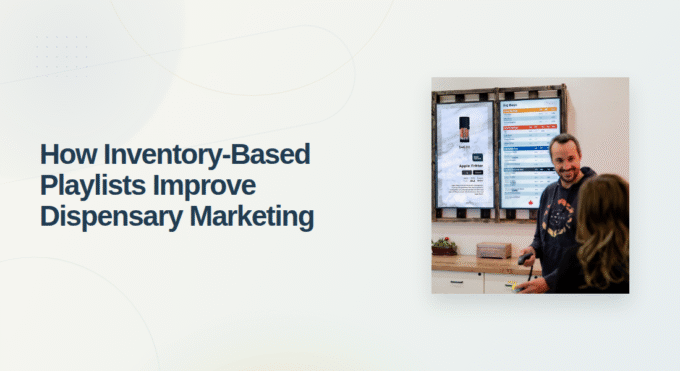
Digital signage allows retailers to display selected information on screens positioned around the store. Product categories can be separated across different layouts, helping customers focus on the information most relevant to them.
A readable design is essential. Clear headings, suitable font sizes, and consistent formatting make product details easier to understand from a distance. Retailers should prioritize the information customers need rather than overcrowding screens with too much text.
2. Keeping Promotions Relevant to Available Products
One challenge in dispensary management is ensuring that promotions reflect current inventory. A product may sell out after a promotional image has already been placed on a screen, creating a mismatch between the message and what the store can offer.
Digital signage platforms with inventory integration can help address this issue. Depending on the software configuration, promotions can be linked to specific products or stock information so that unavailable items are no longer promoted.
This approach helps staff spend less time manually checking every display and reduces the likelihood of customers asking about products that are unavailable. Retailers should still verify inventory records and promotional settings to ensure the information shown is accurate.
3. Scheduling Daily Deals and Marketing Content
Dispensaries may run different promotions on particular days or during selected hours. Updating every screen manually whenever a promotion starts or ends can create unnecessary work for employees.
Scheduling tools allow managers to prepare content in advance and specify when it should appear. A store might schedule a promotional message for a particular afternoon or prepare different content for a weekend event.
This makes the display process more consistent and reduces reliance on last-minute changes. Managers can review planned promotions before they go live and ensure that the wording, timing, and eligibility conditions are correct.
4. Supporting a Better Customer Experience
Customers often enter a dispensary with questions about product availability, pricing, or the differences between available options. Useful digital displays can provide some of this information before a customer reaches the counter.
For example, screens can show product categories, selected product details, store announcements, or relevant promotions. This can help customers orient themselves and prepare more specific questions for staff.
Digital signage should complement personal assistance rather than replace it. Employees remain important for explaining product information, answering individual questions, and helping customers understand details that cannot be communicated effectively through a screen alone.
5. Reducing Manual Work for Store Teams
Managing marketing displays can involve preparing image files, organizing videos, replacing outdated promotions, and coordinating updates across screens. These tasks become more complicated when several employees or locations are involved.
A centralized digital signage dashboard gives authorized staff a single place to manage content. Depending on the platform, managers can upload new media, change display schedules, and distribute approved content without visiting each screen individually.
This can make routine updates easier to coordinate and help teams follow a more consistent process. It also allows managers to spend more time reviewing merchandising priorities instead of repeatedly handling basic display changes.
6. Maintaining Brand Consistency Across Locations
Multi-location dispensaries need to balance a recognizable brand identity with differences in local inventory and promotions. If each store manages its screens independently, visual styles and marketing messages may gradually become inconsistent.
Digital signage systems with multi-location management features can help businesses distribute shared templates and promotional assets across selected stores. Managers can coordinate brand elements centrally while allowing location-specific content where necessary.
This approach is particularly useful when launching a campaign across several locations. Rather than recreating the same material for every store, teams can use shared assets and approved layouts.
However, businesses should ensure that local product availability, pricing, and promotional conditions are handled correctly before content is published.
7. Using Images and Videos to Communicate Messages
Digital signage can display more than static product lists. Retailers may use approved images, videos, branded graphics, and promotional messages to make their displays more varied and visually engaging.
For example, a screen might feature a product category while another presents a scheduled brand promotion. Carefully planned content can help customers notice important information without making every screen look identical.
The goal should be useful communication rather than constant visual movement. Content should remain readable, relevant to the audience, and appropriate for the store’s operating environment. Cannabis retailers must also ensure their promotional materials comply with applicable advertising rules and age-related restrictions.
8. Choosing Digital Signage Software for Dispensaries
Not every digital signage platform is designed for the operational needs of cannabis retail. Before choosing a system, managers should consider how it handles product availability, scheduling, content distribution, and multi-location management.
Useful features may include:
- Inventory-aware promotions: Helps keep displayed campaigns aligned with available products.
- Scheduling controls: Allows content to appear during selected dates and times.
- Centralized management: Makes updates easier to coordinate from one dashboard.
- Media support: Enables retailers to display suitable images and videos.
- Multi-location tools: Helps businesses distribute content across several stores.
- POS integration: Supports coordination between retail data and relevant displays where available.
BudSense provides digital signage solutions designed for cannabis retailers. Its standard features include image and video promotion, in-stock product promotion, scheduled promotions, and daily deals. Digital Signage Pro adds multi-location functionality and bulk actions for operators managing several stores. Retailers can review the available features on the BudSense.
Before implementation, dispensaries should confirm compatibility with their existing systems, the content formats they need, and the level of control required across locations.
Final Thoughts
Digital signage can support modern dispensary management by making product information easier to present, promotions easier to schedule, and marketing content easier to coordinate. When displays are connected to reliable data and managed through a clear workflow, retailers can reduce repetitive tasks while maintaining more consistent communication with customers.
The most effective approach combines suitable software with readable design, accurate information, and regular reviews. By choosing features that match their daily operations, dispensaries can make digital screens a useful part of their overall retail management strategy.
FAQs
1. What is digital signage in a cannabis dispensary?
It refers to digital screens used to display product information, store announcements, promotional images, videos, and other relevant content.
2. How does digital signage help dispensary managers?
It can simplify content updates, support scheduled promotions, improve information presentation, and help coordinate displays across locations.
3. Can digital signage promote only available products?
Some platforms support inventory-aware promotions that use connected product or inventory data to avoid promoting unavailable items, depending on configuration.
4. Can dispensaries schedule digital signage content?
Yes. Supported systems allow managers to schedule promotional content for specific dates or times rather than changing displays manually each time.
5. What should retailers consider when choosing digital signage software?
Important factors include inventory integration, scheduling, content management, media support, multi-location controls, and compatibility with existing systems.